CZ-05 · From Vault Gold
GoHighLevel contact actions: three clicks become one
GoHighLevel contact actions put a small bar on every contact: quick tags you add or remove with one tap, buttons that tag a contact to start a workflow, and buttons that open a short form and fill custom fields. It turns the clicks a team repeats all day into one. Included from Vault Gold, $527 once.
Viewing glass 05
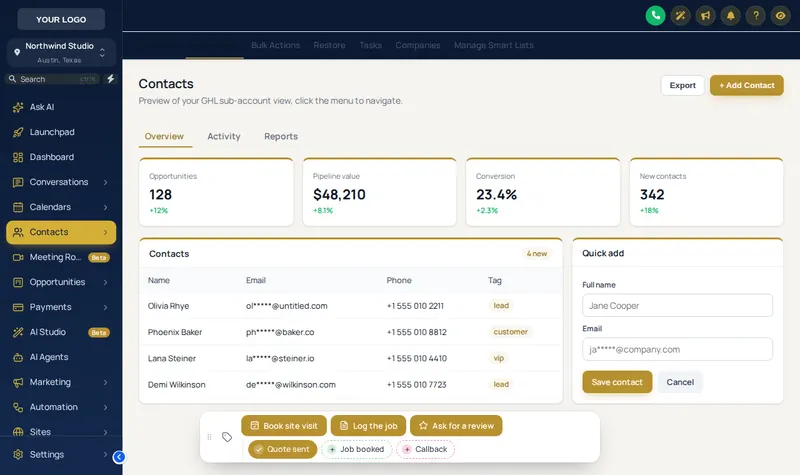
GHL quick tags and buttons, on a real contact
Written for a trade account: Quote sent, Job booked, Callback, plus a Log the job form. Tap the chips, open the form, change the position, or drag the bar.
Opening the glass
A colour per tag The real bar. Tap a quick tag to add or remove it, open Log the job for its form, or drag the bar by its grip. Here nothing is saved; inside GoHighLevel the contact updates at once.
The three parts of the bar
Quick tags
Chips that add a tag when tapped and remove it when tapped again. The chip shows whether the tag is already on the contact.
Tag buttons
A labelled button that adds (or removes) one or more tags, usually the trigger of a workflow: book the visit, request the review, start the reactivation run.
Field forms
A button that opens a short form (number, date, text or dropdown) and writes the answers into the contact’s custom fields in one save.
Problem, then outcome
Where GHL contact buttons save the most time
Tagging a contact in stock GoHighLevel means opening the tag field, typing, picking and saving, and filling a custom field means scrolling to find it. Done fifty times a day, that is where data quality slips. The bar makes the right tag and the right field the easiest thing on the screen.
| As GoHighLevel ships | Once it is set |
|---|---|
| Open tags, type, pick, save | One tap on a chip |
| Scroll to find the custom field | A short form that fills several fields at once |
| Workflows started by remembering the right tag | A labelled button that adds it for you |
| Every user tagging differently | The same tags, spelt the same way, every time |
Bars written for the vault’s trades and practices
Home services
Quote sent, Job booked, Callback, and a Log the job form for value and start date, mirroring the tags a trade snapshot already uses.
Clinics
Booked, No-show, Recall due, and a button that tags the contact for the no-show recovery sequence.
Advisory firms
Documents received, Engagement signed, and a form for matter type and renewal date.
Agencies
Hot lead, VIP and Follow up chips, with a Request a review button for every closed client.
From payment to live
Set up the bar once, use it on every contact
Nothing waits on a person at our end. The checkout creates the account, the platform emails the login, and you do the rest in an editor built for it.
Choose and pay
Pick Vault Silver, Vault Gold or Vault Platinum and pay once through Stripe. No subscription is created.
Get your login by email
Your account is created automatically when the payment clears, and the login (email and a temporary password) is emailed within minutes, at most 24 hours.
Customise in the live editor
Log in, choose a theme, login design, menus and the rest, and watch each change on a live preview of GoHighLevel before anything is published.
Paste one line into GoHighLevel
Copy the line from the editor's Get code screen into Agency Settings → Company → White Label → Custom JS. About 2 minutes, once. Every later change goes live without reinstalling.
Contact actions open at Vault Gold
- Compartment 01
Vault Silver
$227 one time
The look of the whole account: themes, UI kits, dark mode and the login page.
Does not include contact actions
Login emailed within minutes (max 24 hours). One-time payment, lifetime access.
- Compartment 02
Vault Gold
$527 one time
Everything in Silver, plus the screens your team works in all day.
Opens contact actions
Login emailed within minutes (max 24 hours). One-time payment, lifetime access.
- Compartment 03
Vault Platinum
$1,097 one time
The whole vault: every module, widget leads into GoHighLevel and your own branded editor.
Opens contact actions
Login emailed within minutes (max 24 hours). One-time payment, lifetime access.
Contact actions questions
What are GoHighLevel contact actions?
Contact actions are a small bar the customizer adds to every contact record in GoHighLevel. It holds quick tags you add or remove with one tap, buttons that add a tag to start a workflow, and buttons that open a short form and write the answers into custom fields.
What can a contact action button do?
Three things: add tags, remove tags, or open a form whose fields map to the contact’s custom fields (number, date, text or a dropdown). Because tags are what most GoHighLevel workflows trigger on, a button is effectively a one-tap way to start any automation you already have.
Do the quick tags work with a vault snapshot?
Yes. A snapshot from this vault runs on tags such as booked, no-show or review request. Put those tags on the bar and the team applies them with one tap instead of three clicks and a search.
Where does the bar sit on the screen?
In any of 6 positions (bottom centre, bottom left, bottom right, top centre, top left, top right), and users can drag it by its grip. It can also be minimised.
Can the chips use different colours?
Yes: a colour per tag, your theme colour for all of them, or a state style where a chip is green when the tag is on the contact and grey when it is not.
Which package includes the contact actions bar?
Vault Gold at $527, and Vault Platinum. It is not in Vault Silver.
Is anything saved when I try the bar on this page?
No. The preview runs the real bar on a sample contact, but nothing is written anywhere. Inside GoHighLevel the contact updates the moment a chip or button is used.
Does it need a GoHighLevel API key?
The bar acts as the signed-in user inside GoHighLevel, so it can only do what that user could do by hand. There is nothing extra to configure beyond choosing the tags, buttons and fields in the editor.
Other compartments worth opening
- GHL pipeline designsSee the deal the bar just moved.
- Floating quick menuThe other one-tap tool in Gold.
- Feedback and NPS widgetsCollect what the review button asks for.
- How a vault snapshot runs on tagsThe workflows the buttons start.
- GHL Customizer pricingAll three compartments.
- Install the customizerOne line in Agency Settings.
Open the vault
Put the right tag one tap away
The contact actions bar comes with Vault Gold: $527 once, with dashboards, pipelines and mega menus in the same compartment.