CZ-04 · From Vault Silver, mega menus from Vault Gold
A GoHighLevel custom menu that puts the right room one click away
A GoHighLevel custom menu without code: move the sidebar left, right or to a top bar, choose from 8 mega-menu styles, 8 top-bar styles and 8 header styles, and add a floating quick menu your team can drag anywhere. Layouts come with every package; mega menus and the floating menu open at Vault Gold, $527 once.
The floor plan
Every GHL navigation option, by name
Three sets of styles, straight from the editor. Combine any mega-menu style with any header and any layout.
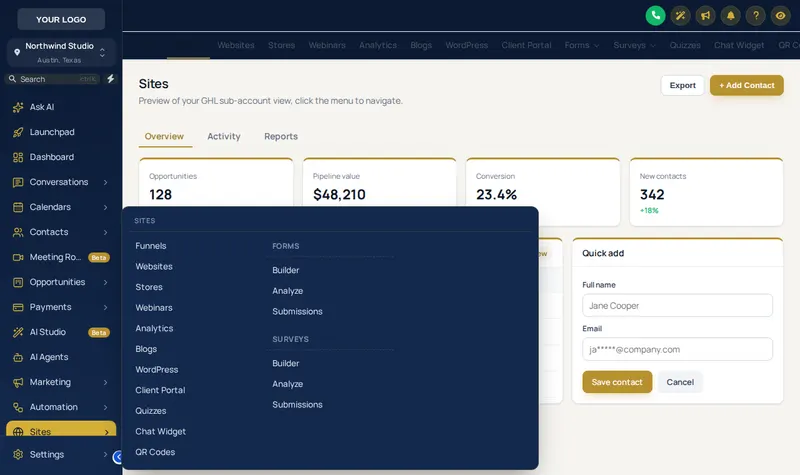
8 mega-menu styles
- Columns Everything at once
- Split List left, menu right
- Cascade Hover an item, menu opens beside
- Tiles Icon cards, click to open
- Tabs Items as tabs, menu below
- Icon rail Slim icons + menu
- Accordion Expands in place
- Wide Full-width band
8 top-bar styles
- Solid
- Floating
- Glass
- Brand gradient
- Underline
- Segmented
- Centered
- Slim
8 header styles
- GoHighLevel default
- Soft tint
- Brand
- Gradient
- Aurora
- Dark
- Glass
- Accent line
Viewing glass 04
Layouts, GHL mega menu and headers
Choose a layout, then hover or click the menu. With a mega style picked, hover Sites to see the panel open.
Problem, then outcome
Why GoHighLevel navigation slows teams down
The stock sidebar lists more than twenty sections and hides the useful pages two levels down. A team that lives in conversations, calendars and opportunities spends the day hunting. A mega menu shows a whole section at once, a top bar gives the width back to wide boards, and a floating menu keeps the screens that matter under a thumb.
| As GoHighLevel ships | Once it is set |
|---|---|
| Long sub-menu lists | Mega menus in 8 styles |
| Sidebar fixed on the left | Left, right or top bar, or icons only |
| A plain header | 8 header styles, from soft tint to glass |
| Hunting for the same pages all day | A floating quick menu with your shortcuts |
Viewing glass 04b
The GoHighLevel floating menu
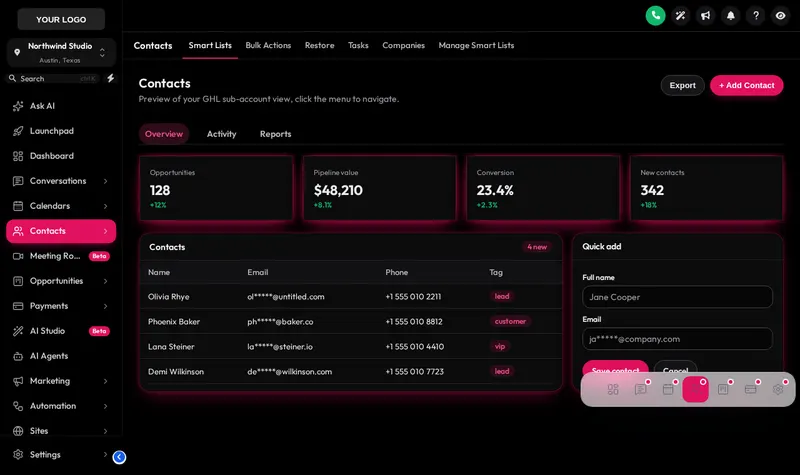
The vault opens it as a glass dock over Obsidian OLED. Try the bubble and the side rail, change the finish, or drag it by its grip.
Who changes the menu, and how
Front desks
A floating quick menu with Conversations, Calendars and Contacts, so the receptionist at a dental or chiropractic practice never opens the sidebar.
Agencies with wide monitors
A top bar in the Segmented or Underline style returns the full width to pipelines and calendars.
Marketing-heavy accounts
The Tabs or Cascade mega menu turns Sites and Marketing, the longest sections, into one panel each.
Resellers
A Brand or Gradient header in the client’s colour makes the top of every screen theirs.
Which compartment holds the menus
Sidebar or top-bar layout is in every package; mega menus and the floating menu start at Vault Gold.
- Compartment 01
Vault Silver
$227 one time
The look of the whole account: themes, UI kits, dark mode and the login page.
Does not include menus
Login emailed within minutes (max 24 hours). One-time payment, lifetime access.
- Compartment 02
Vault Gold
$527 one time
Everything in Silver, plus the screens your team works in all day.
Opens menus
Login emailed within minutes (max 24 hours). One-time payment, lifetime access.
- Compartment 03
Vault Platinum
$1,097 one time
The whole vault: every module, widget leads into GoHighLevel and your own branded editor.
Opens menus
Login emailed within minutes (max 24 hours). One-time payment, lifetime access.
From payment to live
From floor plan to your own navigation
Nothing waits on a person at our end. The checkout creates the account, the platform emails the login, and you do the rest in an editor built for it.
Choose and pay
Pick Vault Silver, Vault Gold or Vault Platinum and pay once through Stripe. No subscription is created.
Get your login by email
Your account is created automatically when the payment clears, and the login (email and a temporary password) is emailed within minutes, at most 24 hours.
Customise in the live editor
Log in, choose a theme, login design, menus and the rest, and watch each change on a live preview of GoHighLevel before anything is published.
Paste one line into GoHighLevel
Copy the line from the editor's Get code screen into Agency Settings → Company → White Label → Custom JS. About 2 minutes, once. Every later change goes live without reinstalling.
GoHighLevel menu questions
Can I change the GoHighLevel menu?
Yes. The customizer can move the GoHighLevel menu (left sidebar, right dock or top bar), collapse it to icons, restyle the header in 8 ways, turn sub-menus into mega menus in 8 styles and add a floating quick menu. It works on the menu GoHighLevel already has, so new GoHighLevel pages still appear.
What is a GHL mega menu?
A GHL mega menu opens a section’s sub-pages as one wide panel instead of a long list, so Sites, Marketing or Payments show everything at once. The 8 styles are Columns, Split, Cascade, Tiles, Tabs, Icon rail, Accordion, Wide.
Which package includes the menu features?
The layout switch (sidebar or top bar) is in every package from Vault Silver. Mega menus, the floating quick menu and announcements open at Vault Gold ($527).
What is the GoHighLevel floating menu?
A small quick menu that floats over every screen with shortcuts to the pages your team uses most. It comes in 3 layouts (Bubble and grid, Dock bar, Side rail) and 8 finishes, and can be dragged anywhere.
Does a top bar layout work on smaller screens?
Yes. There are 8 top-bar styles, and on narrow screens the menu falls back to GoHighLevel’s own mobile behaviour, so nothing becomes unreachable.
Will the custom menu hide anything from my team?
Only if you ask it to. Every GoHighLevel menu item stays reachable unless you choose to hide or reorder it in the editor.
Do announcements belong to the menu module?
They sit alongside it in Vault Gold: a dismissible bar at the top of the account for maintenance windows, new features or training sessions, written and scheduled in the editor.
Can I try the menu layouts first?
Yes. Both viewing glasses on this page run the real engine: change the layout, open a mega menu over Sites, or drag the floating menu around.
Other compartments worth opening
- GHL themes and layoutsTop-bar and right-dock themes.
- The contact actions barThe other floating tool in Gold.
- Dashboard designsQuick links on the dashboard itself.
- Pipeline designsWhat the top bar gives width back to.
- GHL Customizer pricingWhat Silver, Gold and Platinum hold.
- A GoHighLevel VAIf you would rather someone else drove the account.
Open the vault
Stop hunting through the sidebar
Mega menus, the floating quick menu and announcements come with Vault Gold, $527 once, alongside dashboards and pipelines.