CZ-02 · From Vault Silver
GHL themes, UI kits and dark mode for the whole account
Every GHL theme in the vault in one place: 27 complete themes and 11 UI kits for GoHighLevel, with dark mode, a sidebar or top-bar layout, and your own colours and logo. Pick one in the live editor, adjust it, and install it agency-wide with one line of code. All of it is in every package, starting with Vault Silver at $227.
Viewing glass 02
Every GoHighLevel white label theme, switchable live
Start on Royal Navy and Gold, then Prism Pro and Obsidian OLED, or open the whole shelf of 27. Lay a UI kit over it, switch dark mode, and move between contacts, the dashboard and the agency view.
Opening the glass
Royal Navy & Gold The customizer engine itself, restyling a copy of a GoHighLevel sub-account. The menu, the collapse arrow and the form inside it all respond.
The problem it solves
Why stock GoHighLevel undersells a good build
Every agency on the platform hands clients the same grey-and-blue screens. When a snapshot from this vault does a roofer’s follow-up perfectly, the client still sees a tool that looks like everyone else’s. A theme fixes the first impression without touching the build underneath.
It also fixes the long-day problem. Teams who sit in conversations and contacts for hours ask for dark mode more than anything else, and a UI kit with clearer borders makes dense tables easier to scan.
| As GoHighLevel ships | Once it is set |
|---|---|
| The stock palette on every account | Your colours on the sidebar, buttons and active states |
| One light interface, all day | Dark mode for the working screens, one switch |
| The same card and button shapes as every agency | 11 UI kits to change how the interface is drawn |
| A left sidebar, always | Left sidebar, top bar or right-hand dock |
| GHL custom CSS snippets pasted by hand | An editor that writes and versions the code for you |
Shape, then colour
11 UI kits and dark mode
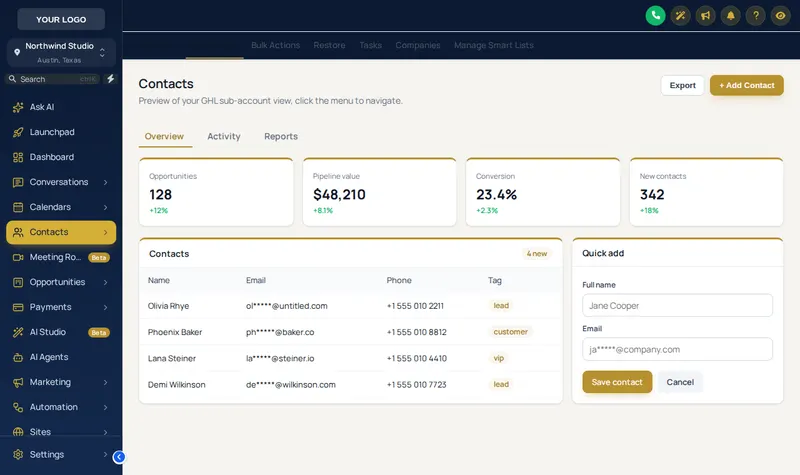
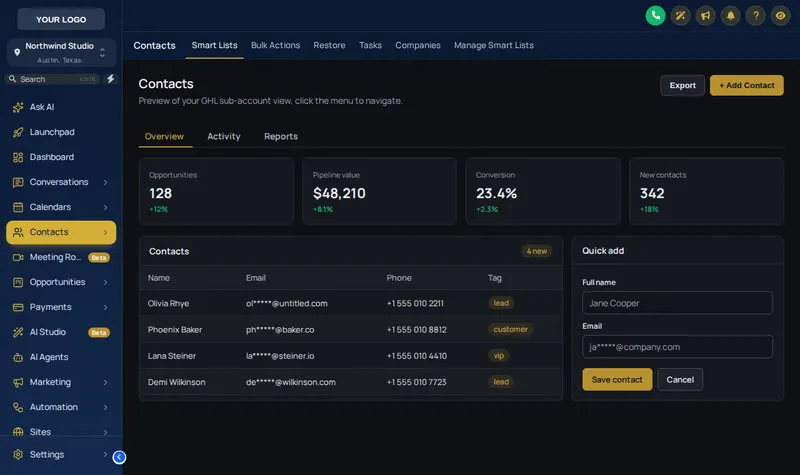
A UI kit changes the drawing of every card, field and table: the same theme can read as soft, flat, glassy or brutalist. Below, the house theme on its own, then with the Bordered Flat kit and dark mode switched on.
- Soft Shadow
- Bordered Flat
- Elevated
- Glass
- Accent Top
- Side Accent
- Brutalist
- Studio Gradient
- Halo Glow
- Crisp Highlight
- Rounded Pill
How agencies in the vault use a theme
One brand across a trade snapshot
An agency that installs the same HVAC or plumbing build in many sub-accounts sets one theme in its own colours, so every client account looks like the agency’s product rather than a rented tool.
Dark mode for the front desk
Clinic and salon teams working conversations all day switch to dark mode, or start from Obsidian OLED, which is dark by design.
A calmer screen for advisory clients
Law, mortgage and insurance clients get a quieter theme such as Editorial Studio with a Soft Shadow kit, which reads as a professional workspace rather than a marketing tool.
A top bar for wide screens
Teams on large monitors take a top-bar theme like Desert Sand and get the full width back for pipelines and calendars.
From payment to live
From this page to a themed account
Choose the theme here, then the account does the rest: login by email, the same editor, one line in your agency settings.
Choose and pay
Pick Vault Silver, Vault Gold or Vault Platinum and pay once through Stripe. No subscription is created.
Get your login by email
Your account is created automatically when the payment clears, and the login (email and a temporary password) is emailed within minutes, at most 24 hours.
Customise in the live editor
Log in, choose a theme, login design, menus and the rest, and watch each change on a live preview of GoHighLevel before anything is published.
Paste one line into GoHighLevel
Copy the line from the editor's Get code screen into Agency Settings → Company → White Label → Custom JS. About 2 minutes, once. Every later change goes live without reinstalling.
Which compartment holds themes
All three. Themes, UI kits, dark mode and the layout switch are in every package; the difference is what else opens alongside them.
- Compartment 01
Vault Silver
$227 one time
The look of the whole account: themes, UI kits, dark mode and the login page.
Opens themes
Login emailed within minutes (max 24 hours). One-time payment, lifetime access.
- Compartment 02
Vault Gold
$527 one time
Everything in Silver, plus the screens your team works in all day.
Opens themes
Login emailed within minutes (max 24 hours). One-time payment, lifetime access.
- Compartment 03
Vault Platinum
$1,097 one time
The whole vault: every module, widget leads into GoHighLevel and your own branded editor.
Opens themes
Login emailed within minutes (max 24 hours). One-time payment, lifetime access.
GHL theme questions
What is a GHL theme?
A GHL theme is a complete visual style for GoHighLevel: sidebar and header colours, buttons, active states, cards, the page background and the login page, applied together. The customizer ships 27 of them, each a starting point you can recolour with your own brand.
Is this a GoHighLevel white label theme?
Yes. The theme loads through the white-label Custom JS box in your agency settings, so it applies to the agency view and every sub-account under it, with your logo and colours instead of the stock look. Clients never see a separate tool.
What is a UI kit, and how is it different from a theme?
A theme sets colours; a UI kit sets shape. The 11 kits change how cards, buttons, inputs and tables are drawn (soft shadows, flat borders, glass, brutalist, pill-shaped and more) and sit on top of any theme, so the same palette can look calm or loud.
How does dark mode work in GoHighLevel with the customizer?
Dark mode repaints the working screens (contacts, conversations, settings, tables and forms) in a dark palette while keeping your theme's accent colour. 3 of the themes are dark by design, and dark mode can be switched on over the others.
Can I change the sidebar to a top bar or move it to the right?
Yes. Of the 27 themes, 21 use a left sidebar, 5 a top bar and 1 a right-hand dock, and the layout can be changed on any theme. Top-bar styles and mega menus are covered on the menus page.
Do I need to know GHL custom CSS to use a theme?
No. You pick and adjust everything in the editor with colour pickers and switches, and the editor writes the GHL custom CSS and script for you. The only thing you paste is one install line, once.
Will a theme slow GoHighLevel down?
The theme is a stylesheet and a small script loaded once per page from the platform. GoHighLevel itself does the heavy lifting as before; the customizer only changes how its screens are painted.
Which package includes themes and dark mode?
Every package. Vault Silver ($227) already includes all 27 themes, all 11 UI kits, dark mode, the layout switch, your colours and logo, and the login page designs.
Can sub-accounts have a different theme from the agency?
The agency theme applies everywhere by default. Packages from Vault Gold up add sub-account self-service, which lets a sub-account choose its own look inside the limits you set.
Other compartments worth opening
- GHL login page designsThe 16 sign-in pages that ship with the themes.
- GoHighLevel custom menusTop bars, mega menus and the floating quick menu.
- GoHighLevel dashboard designs18 designs for the screen clients open first.
- Install the theme with one lineExactly where the custom JS line goes.
- GHL Customizer pricingWhat each compartment holds.
- Snapshots to themeThe builds in the vault.
Open the vault
Put your colours on every account
Vault Silver opens every theme, kit and dark mode for $227, once. Your login arrives by email within minutes.