CZ-06 · From Vault Silver
The GHL login page is the first door a client opens
A GHL login page design replaces GoHighLevel's stock sign-in screen with your own: 16 animated designs, each taking your logo and brand colour, covering sign-in, the two-factor code and password reset. It installs with one CSS line in your white-label settings and is in every package from $227.
The key ring
16 GoHighLevel custom login page designs
Each one is a finished design, not a colour swap. The note beside it is the platform’s own description of the motion or layout.
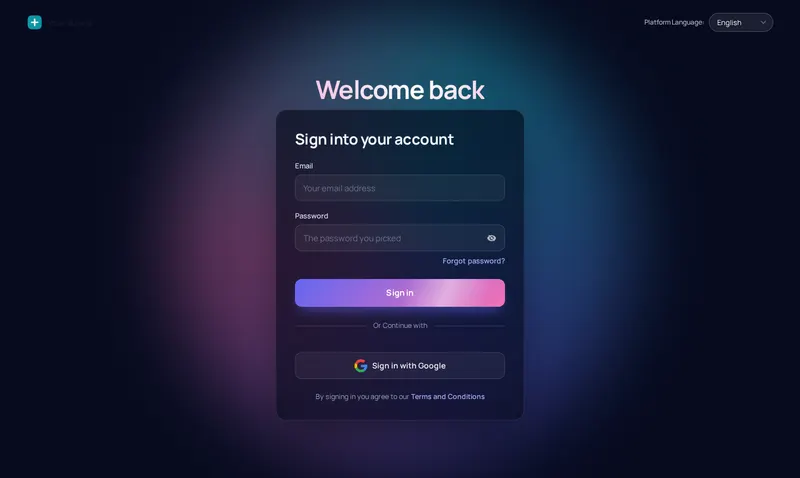
- AuroraDrifting colour glow behind a glass cardDark
- Split heroPhoto panel with your message or quotes, sign-in on the rightLight
- CinematicFull-screen slow-zoom photo, frosted card and rotating quotesDark
- EditorialSign-in on the left, big photo and quotes on the rightLight
- Midnight starsTwinkling night sky, moon glow and rotating quotesDark
- Neon gridMoving retro grid and a spinning glow borderDark
- Prism ringDark page with a slowly turning colour ring behind the cardDark
- Gradient meshSoft colour blobs morphing behind a white glass cardLight
- Ocean wavesLight page with rolling waves and a floating cardLight
- Minimal glowClean white, soft spotlight and a moving accent barLight
- Frosted photoFull-screen mountain photo, crystal glass card, drifting lightDark
- Photo wallSign-in on the left, two photo columns gliding on the rightLight
- Sunrise hillsWarm sky, a rising sun and rolling layered hillsLight
- OrbitDeep space rings with planets circling the cardDark
- Light beamsDark grid with falling light beams and a top spotlightDark
- HolographicPearl page, iridescent glow and a shimmering foil borderLight
Viewing glass 06
Sign in, two-factor and reset, live
The same CSS that is sent to GoHighLevel, applied to a copy of its real login markup. Switch the screen to check the code entry and the reset form in each design.
Opening the glass
Prism ring The same CSS that is sent to GoHighLevel, applied to a copy of the real login markup. Switch screens for the two-factor code and the password reset.
| The stock sign-in | With a login design |
|---|---|
| The platform’s default page and colours | Your logo, your colour, a designed page |
| Two-factor screen falls back to stock | Sign-in, two-factor and reset match |
| Hand-written GHL login CSS that breaks on updates | A maintained design loaded by one line |
| Nothing to say the account is yours | A first screen clients associate with your agency |
Why the login comes first
What a GoHighLevel white label login changes
A client meets the login page before any dashboard or pipeline. If it looks like the platform, the agency looks like a reseller; if it looks like the agency, the rest of the account inherits that trust. That is why every package, even the first, includes all 16 designs.
It also cuts a support question. Clients who land on a branded page know they are in the right place, and the two-factor screen in the same design stops the “is this a phishing page?” email.
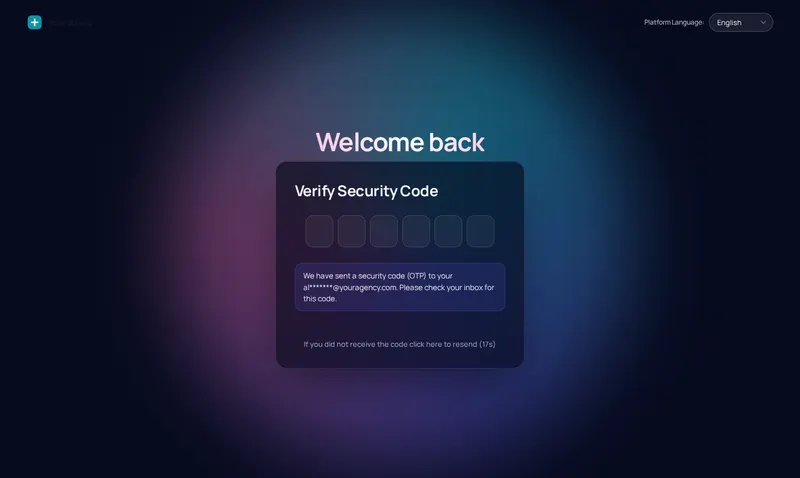
The two-factor screen, in the same design
Prism ring carried through to the security-code step. Every design covers this screen and the password reset, so no part of signing in drops back to the stock look.
- Your logo at the top of every screen
- Your brand colour on the button and focus rings
- Google sign-in and terms links left exactly where GoHighLevel puts them
Which design for which client
Clinics and wellness
Light, calm designs such as Minimal glow or Sunrise hills read as a patient portal, not a sales tool.
Law, mortgage and insurance
Editorial or Split hero with a firm photo: a sign-in page that looks as considered as the firm’s letterhead.
Growth and SaaS resellers
Animated designs like Prism ring, Orbit or Light beams make the platform feel like your own product from the first second.
Trades
Frosted photo with a picture of the client’s own crew or fleet, so the account is recognisably theirs.
From payment to live
From the key ring to your login page
The login design rides on the same account and the same editor as the theme. It adds one CSS line beside the script line.
Choose and pay
Pick Vault Silver, Vault Gold or Vault Platinum and pay once through Stripe. No subscription is created.
Get your login by email
Your account is created automatically when the payment clears, and the login (email and a temporary password) is emailed within minutes, at most 24 hours.
Customise in the live editor
Log in, choose a theme, login design, menus and the rest, and watch each change on a live preview of GoHighLevel before anything is published.
Paste one line into GoHighLevel
Copy the line from the editor's Get code screen into Agency Settings → Company → White Label → Custom JS. About 2 minutes, once. Every later change goes live without reinstalling.
Login designs are in every compartment
- Compartment 01
Vault Silver
$227 one time
The look of the whole account: themes, UI kits, dark mode and the login page.
Opens login pages
Login emailed within minutes (max 24 hours). One-time payment, lifetime access.
- Compartment 02
Vault Gold
$527 one time
Everything in Silver, plus the screens your team works in all day.
Opens login pages
Login emailed within minutes (max 24 hours). One-time payment, lifetime access.
- Compartment 03
Vault Platinum
$1,097 one time
The whole vault: every module, widget leads into GoHighLevel and your own branded editor.
Opens login pages
Login emailed within minutes (max 24 hours). One-time payment, lifetime access.
GHL login page questions
Can I change the GoHighLevel login page?
Yes. GoHighLevel lets an agency add custom CSS to its white-label login page, and the customizer uses exactly that: one CSS line in Agency Settings → Company → White Label → Custom CSS loads the design you chose in the editor. Nothing else about signing in changes.
How many GHL login page designs are there?
16, from calm (Minimal glow, Editorial) to animated (Aurora, Ocean waves, Orbit, Prism ring). 8 are dark and the rest light, and every one takes your logo and brand colour.
Do the designs cover two-factor and password reset?
Yes. The same design styles the sign-in form, the two-factor code screen and the password reset page, so a client never drops back to the stock look halfway through logging in. The viewing glass on this page shows all three screens.
Does a custom login page affect security?
No. The design is CSS only: it changes how the page looks, not how it works. The form, the password check, two-factor and Google sign-in are GoHighLevel’s own and behave exactly as before.
Which line installs the login design?
The CSS line: @import url("https://customizer.ghlcustomercare.com/lc/YOUR-KEY.css"); with your own key in place of YOUR-KEY. It goes in the Custom CSS box, next to the Custom JS line that installs the rest of the customizer. Both are shown, filled in, on the editor's Get code screen.
Can the login page use a photo?
Yes. Several designs (Frosted photo, Photo wall, Split hero, Cinematic) are built around an image, and you can set your own background picture in the editor.
Is the login design included in the cheapest package?
Yes. All 16 designs are in Vault Silver at $227, and in every package above it.
Will clients see GoHighLevel branding on the login page?
They see the logo, colours and design you set. The login page is the first screen of your white label, which is why it is in the first compartment.
Other compartments worth opening
- GHL themes and dark modeThe theme each login design pairs with.
- The login CSS line, step by stepWhere the Custom CSS line goes.
- The dashboard after the login18 dashboard designs.
- Menus and navigationTop bars, mega menus, floating menu.
- GHL Customizer pricingAll three compartments.
- Snapshot installation and handoverHow a vault build is installed.
Open the vault
Give clients your door, not the platform's
All 16 login designs come with Vault Silver for $227, paid once. Pick one tonight, paste the CSS line, done.